

What's New?
Recent Updates to ITS4ThaiWe are always working behind the scenes to bring you the best Thai Language learning environment on the Internet. If we release a new feature that shows up on our website, we'll tell you about it here. Please feel free to send us any ideas for new features or any comments on existing features to info@its4thai.com |
|
|
DVD with Videos of Conversation LessonsMarch 13, 2010Many of you have asked us for offline resources that you can use to study on the train or plane, or anywhere away from your computer. We have offered PDFs and eBooks in the past, and this month we have a new way to take ITS4Thai with you: a DVD with videos from each of the 76 Conversation Lessons from ITS4Thai. You can easily play these videos on your computer or take them with you on your iPod or iPhone. In addition to the over 10 hours of video on this DVD, we have included the PDF eBooks with all of the lesson content and flashcards for these 76 lessons. If you were to buy all eBooks and Videos separately, the total price would be US$29.97. But for your convenience, we have bundled everything together for only US$24.99 For more information, please visit our DVD page at Lulu.com. Good luck with your Thai studies, both online and off! |
|
|
Help Us Reach Non-English SpeakersFebruary 12, 2010We describe ITS4Thai as "a website to help English speakers to learn Thai". But we know that many non-English speakers would like to learn Thai as well. If you speak a language other than English, we invite you to help us translate our vocabulary words into your native language. If you are able to help us, please visit our Dictionary pages and log in with your ITS4Thai username and password (if you haven't already logged in). You will be shown one English word at a time and asked to add the translation in your native language. We are a small team at ITS4Thai, so we really appreciate you helping us teach Thai language to as many people as possible! Please visit our Dictionary pages any time and add as many words as you can. Thank you!
|
|
|
eBook PDF Store Now OpenFebruary 10, 2010ITS4Thai is the best way to learn Thai online. But sometimes you might want to study Thai away from a computer connected to the Internet. That's why we now offer eBooks in PDF format through the ITS4Knowledge store at Lulu.com. (ITS4Knowledge is the parent company of ITS4Thai.) Our current selection of eBook PDFs include:
|
|
|
New Media Tab in LessonsFebruary 5, 2010We have created a 5th lesson tab -- called "Media" -- that will contain downloads and videos for each lesson. The downloads include a printable PDF version of the lesson, as well as PDF flashcards that you can print out and study anywhere. The videos are screen captures of the games, and are a great way to review the words in each lesson. All of the lessons should have the PDFs available now, and we are currently adding the videos to each lesson as well. So check out the "Media" tab in each lesson to find other resources to help you learn Thai, both online and offline! |
|
|
Thai Script Course 2 Available NowJanuary 24, 2010The long-awaited Thai Script Course 2 is now available at ITS4Thai! The 30 lessons in the new Thai Script Course 2 teach you:
With the 60 lessons in these two courses, you will be able to read any Thai word that you see! |
|
|
Lesson VideosJanuary 11, 2010We have been hard at work making videos for all of the 200+ Thai Language lessons at ITS4Thai. We have added the first set of videos to both YouTube, but also to the Free Conversation and Free Vocabulary Courses. Feel free to check out the videos at YouTube (just search for ITS4Thai) or on the ITS4Thai site. We will also be adding similar videos to each of the 200+ online lessons at ITS4Thai. These videos should start appearing in the lessons next week. Soon, we will have over 30 hours of video available for you to watch at ITS4Thai. |
|
|
Improvements to the MyThai DashboardJune 9, 2009We made a few additions to the website today. The first is that we added audio files for all words in the Word List in each lesson. When you click on a lesson from the Lesson List, scroll down to the word list and you will see blue play buttons. Click the button to hear the word. Here's a picture of what it looks like (but it's just an image... you can't click it!)

We also added two new articles to the site. The first one is an Introduction to Thai Language, and the second is an Introduction to Thai Tones. If you are still struggling with your tones, check out the Thai Tones page and maybe it will set you on the right path. |
|
|
Improvements to the MyThai DashboardJune 7, 2009As you study the Thai language at ITS4Thai, we hope that you have been taking advantage of the My Thai Dashboard which tracks your progress as you learn more and more Thai. The My Thai Dashboard is also your personal Thai Language instructor who can recommend what you should study next. The My Thai Dashboard also keeps track of the number of words that you have learned (or as we call it, "Mastered"). Thanks to feedback from some of our students, we realized that the Mastered list wasn't including all of the words that you might have learned. So we just made a behind-the-scenes fix that will give a much more accurate number of Mastered words... and chances are the new number is bigger than the old one. We encourage you to check in to how many words you have learned at ITS4Thai. To do this, just log in to ITS4Thai and click on the My Thai button in the top right corner. |
|
|
ITS4Thai is now on Facebook!March 29, 2009ITS4Thai joined Facebook today. If you have a Facebook profile, please help us spread the word by becoming a "Fan" of ITS4Thai. You can find us by searching for "Thai Language" in the search box in the upper right corner of any Facebook page. We'll be sure to post ITS4Thai updates to Facebook, so it's a great way to keep in touch with us. As always, thank you very much for your support of ITS4Thai! |
|
|
New Subscription ModelMarch 27, 2009We have been offering individual Conversation, Vocabulary, and Thai Script Courses for several months now. And as of last week, we now have over 200 lessons that can teach you over 2,000 Thai words and 1,500 sentence combinations. Our lessons cover a wide range of every-day situations that are guaranteed to help you communicate with your Thai friends more easily. Starting today, we are offering additional ways to access the great learning content at ITS4Thai. We now offer three low-cost ways for you to become fluent in the Thai language. You can:
|
|
|
Vocabulary Course 2 ReleasedMarch 20, 2009Today we are releasing our latest course: the 40_Lesson Vocabulary Course 2. The format of this course is similar to the Vocabulary Course 1, but with about 400 new words for you to learn. The topics covered in Vocabulary 2 include: things at home, things in the city, people and professions, prefixes and suffixes, health, medicines, drugs, and diseases. If you have never bought a Vocabulary Course, we encourage to you check it out. It's a great way to add words to your working vocabulary. All of the words that you study in this course are available for you on your "My Thai" page as well. Vocabulary Course 2 can be purchased for only US$11.99 (399 Baht). See the Courses page for more information. |
|
|
Complete Conversation Course 2 ReleasedFebruary 19, 2009After a short hiatus, we are back with new content at ITS4Thai. We have just released a new Conversation Course. This course uses the same great interactive games to teach you around 400 words as well as sentences that include these words. The lessons cover subjects such as doing business, having fun, eating, and small talk. You can purchase the 40 lessons in this course for just US$14.99 (499 Baht) More courses are on the way, including additional vocabulary courses as well as the long-awaited Thai Script 2 Course. |
|
|
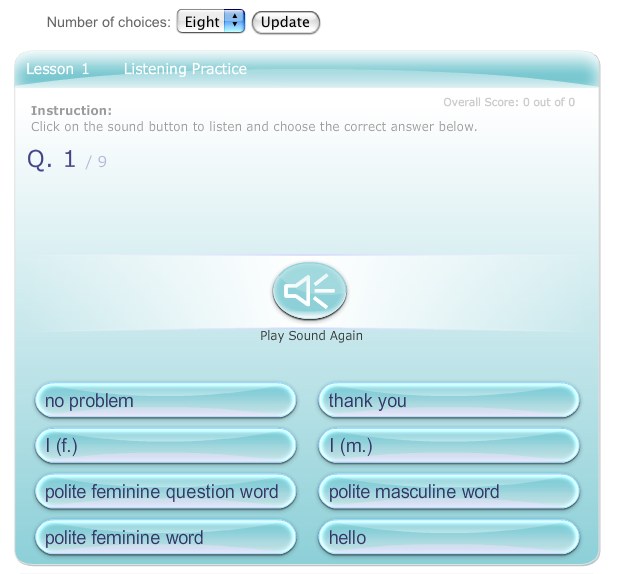
Control the Number of Choices in the Listening GameOctober 3, 2008Last month we gave you the ability to choose the number of word choices you get in the Word Practice game. Now we have extended that functionality to the Listening game as well. The screen shot below shows you what you will see when you play this game. (This is a screen shot image, so you can't actually select or click on the Update button!)
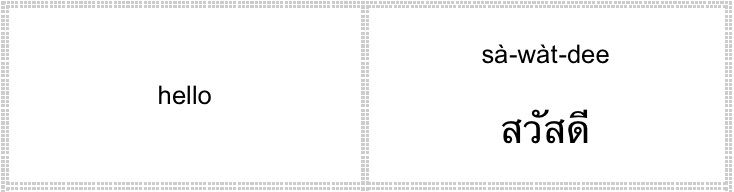
 Printable FlashcardsSeptember 19, 2008One of the best ways to learn the vocabulary of a new language is by creating flashcards and taking them with you wherever you go. We think this "old-fashioned" study method is a great one, but making hundreds of flash cards can be time-consuming, so we made them for you! Today we have uploaded printable flash card pages for every lesson in all of our courses. You just have to click on the new link on the lesson page, print them out, cut on the dotted lines, and fold them over and you will have the English word on one side and the Thai Script and Thai Phonetic meanings on the other. Perhaps we should give a prize to the first person we see using the ITS4Thai Flashcards on the Bangkok skytrain or subway!
 |
|
|
Control the Number of Choices in the Word Practice GameSeptember 17, 2008We just uploaded a new version of the Word Practice game. There are two new features that can be seen in this new version. The first new feature is that if you ever make a mistake, your incorrect answer will be shown along with the correct one. This should help you see where you are making mistakes so that you can fix your misconceptions. The second features allows you to determine the number of answers that you get to choose from. The old version always had four choices, but now you can choose between four, six, or eight choices. This choice is available in a drop down menu directly above the game, as shown in the screen shot below. The default for now is four, but we encourage you to try to max it out at eight, to help you hone your vocabulary skills! (This is a screen shot image, so you can't actually select or click on the Update button!) 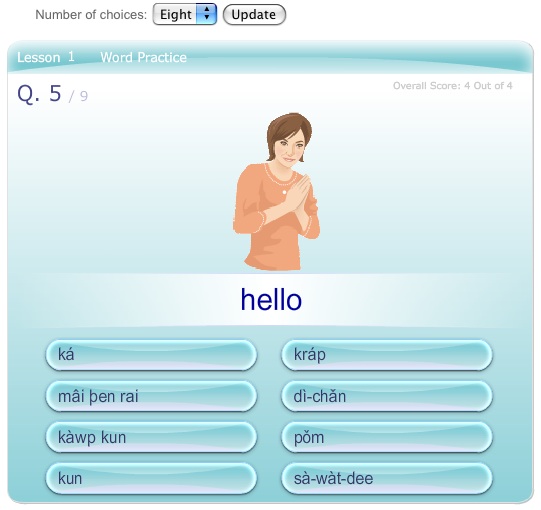 |
|
|
Moving from Lesson to LessonSeptember 15, 2008Sometimes the smallest changes can make a big difference in the way you use a website. Today we added links at the top of each Lesson page that allow you to go to the next or previous lesson, without having to go back to the Lesson List first. We hope that makes navigating ITS4Thai much easier! |
|
|
Printing Your Flagged Word ListSeptember 13, 2008The recently added "Flagged Words" feature seems to be very popular. Today, we improved this feature by creating a printable version of you Flagged Words List. Now, you can take an up-to-date print out of your list along with you to study on the train to work or while you're waiting for friends at the cafe. |
|
|
Tagging Words to Study LaterAugust 27, 2008We have just added the ability to "flag" any words that you want to keep track of to study later. The words can be flagged in each lesson, and a full list can be seen on your MyThai Dashboard. The page with your Flagged Word List will also allow you to search and add other words from your course(s) to the list. Also from the MyThai Dashboard, you can practice your flagged words using the "Practice Words" game. This new feature will allow you to track various words that you might want to study later. Perhaps you are having trouble remembering the meaning of one Thai word in particular. You can flag the word and then study it later at your convenience through the Dashboard. |
|
|
Scoring Guesses in the Word Practice GameAugust 23, 2008When doing multiple-choice quizzes like the Word Practice Game in the Conversation and Vocabulary Courses, sometimes you might take a wild guess and still get the right answer. (You have a 25% chance, afterall.) But if you just guessed correctly, does that mean that you now know the word? It might be a good idea to practice that word again. To help you with this, after every question you answer correctly, you have the choice between not counting the score, or telling ITS4Thai that you are confident that you know the answer. If you guessed or are not sure about the answer, you can click the "Don't Score This" button. If you are confident that you knew the answer all along, you can click the "I know" button. Clicking the "Don't Score This" button will allow you to see the word and practice it again at the end of the game. This repetition will help cement the meaning of the word in your long-term memory. And if you don't want to worry about this distinction, then you can click on "I Know This Word" or just hit the space bar every time to advance to the next question. Here's what the new feature looks like: 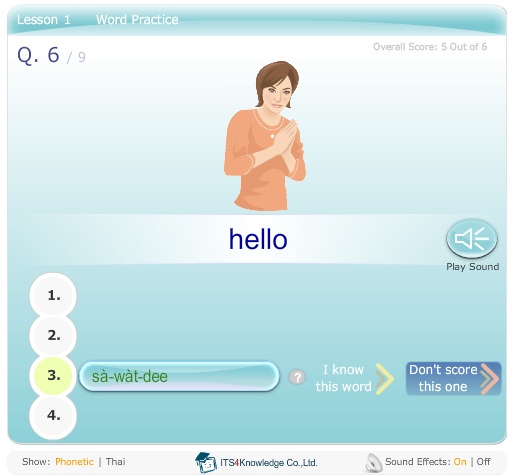 |
|
|
Introducing the MyThai DashboardAugust 8, 2008One of the hardest parts about studying a new language is that there is just so much to learn! We know that sometimes it seems like you are not making any progress at all. But today we are giving you a new tool at ITS4Thai to help you track your Thai language learning: the My Thai Dashboard. This revolutionary new feature keeps track of all of the little steps you are taking towards your goal of speaking Thai. It will help you answer the following questions:
|
| Please feel free to send us any feature ideas or comments on existing features to info@its4thai.com |